Craft · · 6 min read
How to label a UI sketch so the model stops guessing
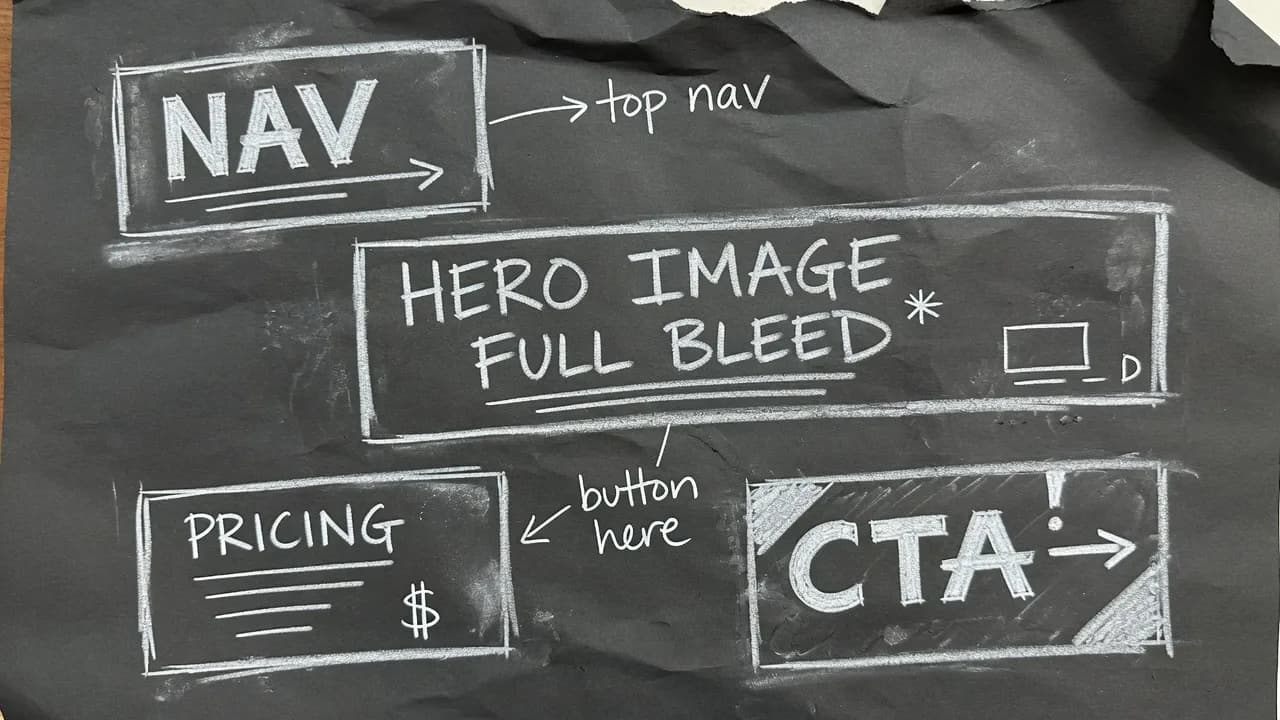
A labelled rectangle is an instruction. An unlabelled one is a guess. That is the whole method, and it is the largest single improvement we have measured on a generated screen.
Name the region, not the pixels
You do not need to annotate every element. You need to remove the guesses that would change the layout. A wide box at the top of a frame could be a navigation bar, a hero image, a banner or a table header. Write "nav" and three of those options disappear.
Three kinds of label that pay off
Component type: nav, hero, sidebar, card row, footer, empty state. The model has seen all of these. The label picks which one.
Real copy: the heading you actually want, the button that says "Start free", the price you intend to charge. Placeholder latin is a request for generic marketing.
A constraint on size: "full bleed", "sticky", "one column on mobile". These are cheap to write and expensive to reverse after the screen exists.
What not to label
Padding, exact hex values, font files. Those belong on the mood board and the design system, not in the sketch. The sketch decides hierarchy. The board decides feel.
Fifteen seconds
A frame with six words written in it consistently produces a more intentional design than the same frame with none. Start free and try it, or read how a labelled sketch becomes a UI.
Questions
- Do I need to draw well?
- No. Boxes are enough. Writing a word or two inside them is what changes the result.
- What should I write in a box?
- A component type, a piece of real copy, or a size constraint. Those three remove the guesses that would change the layout.
Keep reading
- How a labelled sketch becomes a UI
You do not prompt a layout into existence. You draw the boxes, write what they are, and the screen is generated from that.
- A mood board is how the fifth screen matches the first
A palette of eight nice colours is a mood. A palette where each colour is bound to a role is a system.
- Uizard turns a sketch into a wireframe. SketchMason turns it into a design.
Both take a photo of a napkin. What comes back is the difference: an editable wireframe, or a finished screen built from your own design system.